BacklinkGPT Alternatives: Your Own Inbox or a Separate Sender?
By Jake15 min read
On this page
BacklinkGPT is an AI agent that earns backlinks for founders and business owners, pitching from their own inbox or LinkedIn profile. For one site run by its owner, that’s a tidy setup. Agencies, teams that want cold email kept off their main domain, and anyone who needs more than 30 emails a day from a mailbox will want to look further. Below are seven BacklinkGPT alternatives, sorted by how they send. Every price and feature comes from the vendor’s own pages as of October 18, 2026.
Comparing just the two? Linkade vs BacklinkGPT puts them side by side on price, features and who each one suits.

What you’ll learn
- BacklinkGPT pitches as you, from your own inbox or LinkedIn profile, and says it isn’t built for agencies.
- Decide where your pitches should come from before you compare tools.
- Add the site fees it expects, often $75 to $250 a link, to the plan price.
- Stay with BacklinkGPT if you promote one site and want editors to hear from you by name.
What BacklinkGPT does
BacklinkGPT offers an AI agent “to earn your backlinks,” aimed at businesses without an SEO team. Each night it hunts for competitor backlinks, resource pages, guest post openings and unlinked mentions of your brand. It scores each page on the site’s policy, its relevance, its authority and how easy the editor is to reach, then marks it Keep, Drop or Second look with the reason written down.
For each page it keeps, it finds the editor’s email and LinkedIn and drafts a pitch about that page. The pitch goes out in your name from your own mailbox, whether that’s Gmail, Google Workspace, Outlook, Microsoft 365 or any IMAP host, or from your LinkedIn profile. Its docs suggest a separate address on your domain, such as outreach@, for higher volumes. LinkedIn is worth adding only with Premium or Sales Navigator, since a free profile sends about one invite a day.
A new mailbox warms up over four weeks, from 2 to 5 emails a day in week one to 25 to 30 in week four. After that it stays at 30 a day, the most any one mailbox sends. Every draft waits for your OK at first. Once you’ve approved 5 email pitches with little editing, email switches to sending on its own. It tells you when that happens, and one click switches it back. Replies arrive labelled with a suggested answer, and nothing goes back to an editor without you.
Money is part of the plan. Its pricing page says most good sites ask a fee to add your link, often $75 to $250, on top of the subscription. The agent negotiates within a budget you set, and you approve every payment. With a $0 budget it sticks to free asks. Won links are verified and then checked every day, and it tells you when one is lost or turns nofollow.
Before the comparison, a disclosure: Linkade publishes this guide and is one of the seven options in it. Facts about each product come from its maker’s own site, read on October 18, 2026. We haven’t run every product ourselves, so use the fit notes to plan your own trial rather than as a final answer.
Decide where your pitches come from
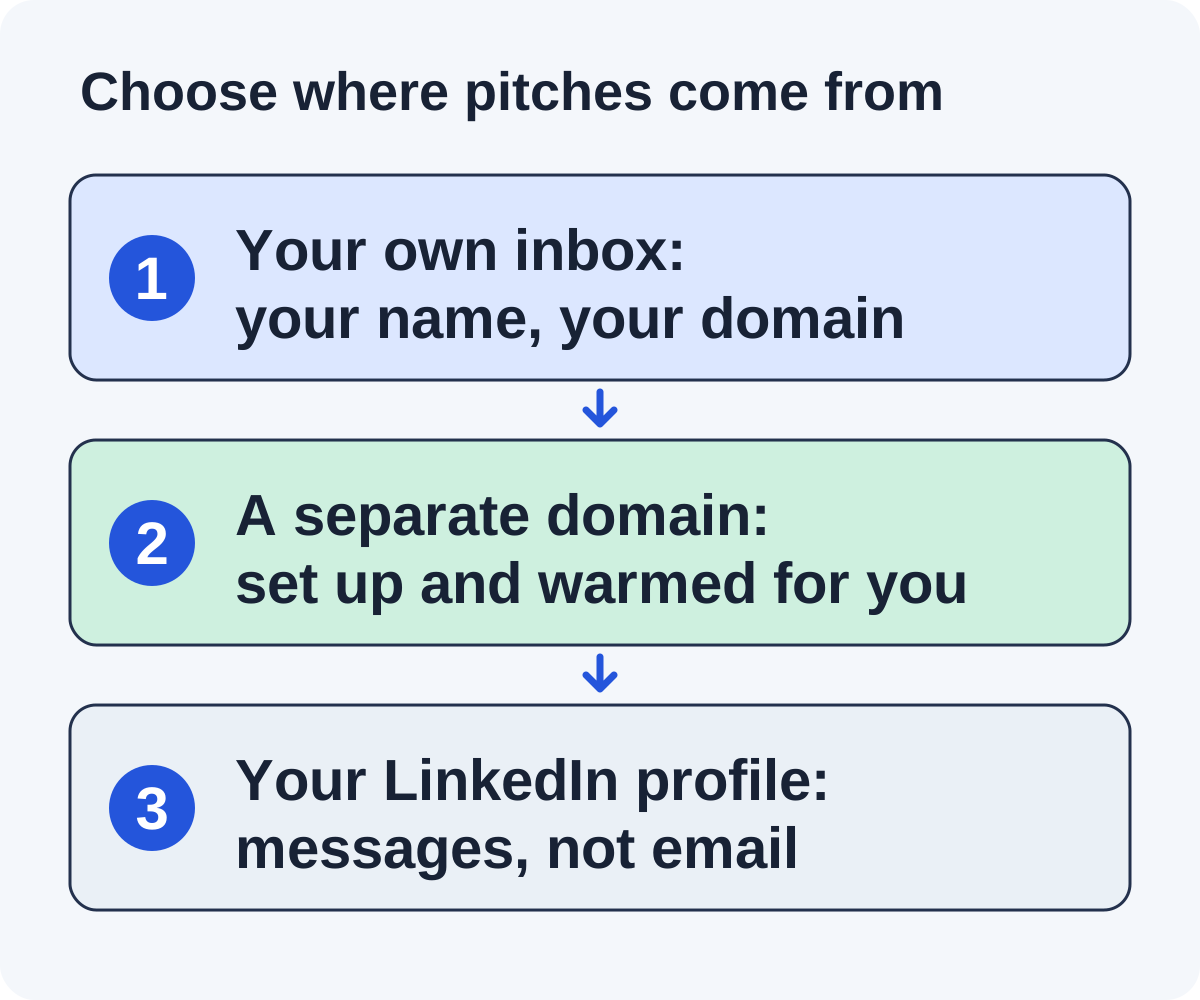
Every outreach tool sends from somewhere, and that choice shapes everything after it. There are three common answers.
Your own inbox. Pitches go out under your name from the address you use every day, or an alias on the same domain. Replies land with the rest of your mail, and the editor sees a real person at a real company. The trade-off is that cold email builds or spends the reputation of the domain your customers and invoices also rely on, and each mailbox has a daily ceiling.
A separate domain. The tool buys a second domain, sets up a mailbox on it and warms it up. Your main domain never sends a cold pitch, and an agency can give each client a sender of its own. The trade-off is a wait before the first email, and an address editors haven’t seen before.
Your LinkedIn profile. Some editors answer a message sooner than an email. How far it reaches depends on your account: BacklinkGPT notes that a free profile sends about one invite a day.
A simple rule helps. If you’re a founder promoting one site and your domain sends little else, your own inbox is fine. If you run outreach for clients, or your main domain carries sales and billing email you can’t put at risk, a separate sender is the safer choice. Our sender readiness guide covers the setup either way.
Compare the alternatives at a glance
| Option | Where pitches come from | Price and main limit |
|---|---|---|
| Linkade Best for agencies, and founders who want cold email off their own domain | A separate domain and mailbox Linkade buys and warms up | Monthly plans, no contract. See pricing. Limit: you write every reply and any guest post. |
| Pitchbox Best for agencies running many campaigns | Mailboxes you connect and warm up | From $300 a month billed monthly, or $210 billed annually. Limit: one-year commitment on every plan. |
| BuzzStream Best for teams that write their own pitches | Mailboxes you connect | From $49 a month. Limit: bulk sending starts on the 3-user plan. |
| Respona Best for links with no email sent in your name | Its own team | $100 to $500 per placement. Limit: you don’t choose the sites unless you pay extra. |
| MentionAgent Best for mention swaps with no site fees | A Gmail inbox on a domain it registers for you | From $99 a month. Limit: most deals ask you to mention the site back. |
| By hand Best for a first campaign | Your own inbox | Your time. Limit: every step is yours. |
| An agency Best for handing off the whole job | Varies by agency | Usually a monthly retainer. Limit: you see less of the work. |
For comparison, BacklinkGPT starts at $149 a month for one inbox or LinkedIn profile, plus any site fees you approve. These prices were checked on October 18, 2026, and vendors change them, so look at each pricing page before you buy. Each row is explained below.
Seven BacklinkGPT alternatives
1. Linkade
Linkade is outreach software that finds sites in your market and pitches them for guest posts and link inserts, from a sender that isn’t your inbox. Linkade buys a separate domain, creates a mailbox on it and warms it up before the first pitch, so your company address never sends cold email and there’s nothing to connect.
It finds sites through your competitors’ backlinks, search results for your keywords and writing about your market, and widens the search when one source runs dry. Each site is judged on its metrics and its fit. It drops competitors, sites that no longer publish and anything outside your market, but keeps sites that charge, and paying them is up to you. The first email talks about something the site published and asks whether they’re interested. The link only comes up after a yes. Each mailbox sends up to 50 emails a day, 5 to 7 minutes apart, with one follow-up after 4 days, and stops when someone replies.
Approval is the default. Automatic sending is a switch only you turn on, and it never flips itself. Linkade sorts each reply so the interested ones come first, and you write the answer. Each placed link gets a check every 24 hours: live, lost or changed. Larger plans run several clients side by side, each with its own sender domain and mailbox.
It fits agencies, and founders who want cold pitches kept off their main domain. Plans are monthly with no contract. See pricing. Free setup, with no card, puts real prospects for your domain in front of you in about 5 minutes. There’s no free trial beyond that.
The limits, next to BacklinkGPT: Linkade doesn’t pitch on LinkedIn, draft replies or negotiate fees for you. You can’t invite teammates. A new mailbox needs three weeks of warm-up before the first email, and Linkade started in 2026, so its record is short. See Linkade vs BacklinkGPT.
2. Pitchbox
Pitchbox sells itself as “The AI Outreach Platform for link building and AEO,” and agencies are its core buyers. It covers what BacklinkGPT leaves out for them: white-label client reports, more than 20 ways to prospect, a link building CRM and an AI Reply Agent for publisher replies. It also plugs into Zapier, Slack and an API, and reads data from your Ahrefs, Semrush, Moz or Majestic account.
Like BacklinkGPT, it sends from mailboxes you connect and warm yourself, and rotation across mailboxes starts on the second plan. Pro is $300 billed monthly or $210 billed annually, with 2 users and 2 email accounts. Advanced is $600 or $420, and Scale is $1,200 or $825. You book a demo before a free trial.
The limit: you sign up for a year on any plan, and your own people run the campaigns. Read our Pitchbox alternatives guide or Linkade vs Pitchbox.
3. BuzzStream
BuzzStream is the CRM option: one shared record of prospects, contacts, email and links for digital PR and link building teams, in business since 2008. Newer AI features look up contact details and put media lists together.
It suits teams who research and write every pitch themselves and want the history in one place. One user and 500 contacts cost $49 a month on Starter. Three users cost $174 on Growth, and six cost $424 on Professional. Billing is monthly with no minimum term, and there’s a free trial.
The limit: the pitches are yours to write, bulk sends wait for the 3-user plan, and your data is deleted 14 days after you cancel. See our BuzzStream alternatives guide and Linkade vs BuzzStream.
4. Respona
Respona takes sending off your hands entirely. It sells link placements at $100 to $500 each, priced by the DR of the linking site, and one team does the finding, writing, outreach and publishing. A link takes 28 days as standard, and 14 if you pay more.
It suits teams who want links without any email going out in their name. Respona says each placement you order goes live in the agreed time, and discounts start once you spend $3,000 a month.
The limit: its team chooses the sites unless you pay extra to approve each domain, and you never deal with the editors. Its former outreach software is now AI Backlink Builder, a Semrush App Center app at $169 a month. See our Respona alternatives guide and Linkade vs Respona.
5. MentionAgent
MentionAgent is the agent most like BacklinkGPT, with a different answer on where the email comes from. It registers a sending domain for you, sets up a Gmail inbox on it and warms it up, so your own address stays out of it. It searches Google for posts on your subject, checks each domain, verifies the editor’s address and builds each pitch around their post. Approval is the default there too, and auto-send becomes available after warm-up starts.
The deal differs too. Most of its deals are mutual mentions: they add a line about you, and you add one about them to a post you’ve published. It doesn’t buy placements and refuses sites that want payment, where BacklinkGPT will pay within your budget. It checks your links nightly and asks ChatGPT, Claude and Gemini about your market twice a month. Prices go by inbox, from $99 a month for one up to $629 for eight, with a full refund within 14 days. Agencies can add a client site for $99 a month, with its own inbox.
The limit: you’ll usually link back, and sites that charge are off the table. A site tops out at 80 emails a day from two inboxes unless you pay for more. See our MentionAgent alternatives guide and Linkade vs MentionAgent.
6. Pitching by hand
Your own inbox and a spreadsheet are enough for a first campaign. That’s close to how BacklinkGPT sends anyway: from your address, in your name. The difference is that you do the finding, checking and writing.
It’s a sensible way to learn which sites in your niche say yes before you pay for any tool. Our guides to prospecting, personalizing outreach email and follow-ups cover the work.
The limit is your hours. Nobody warms your mailbox, spaces out your sends or checks that a link is still there a month later.
7. Hiring an agency
An agency is the answer when nobody at your company wants to approve drafts at all. It plans the campaign, picks the sites, sends the pitches and reports back.
Prices vary and are rarely published. BuzzStream’s survey of roughly 70 digital PR agencies and freelancers, updated June 12, 2026, found about 90% of the agencies on a monthly retainer, an average monthly contract of about $5,458 and an average cost per link of $597.
The limit is control. Ask which address the pitches come from, whether fees paid to sites are inside the retainer, and who keeps the editor contacts if you part ways.
When to stay with BacklinkGPT
BacklinkGPT suits a lot of owners, and moving costs you a new warm-up. Stay if most of these fit:
- You promote one site of your own, not clients’ sites.
- You want editors to hear from you, at your own address or on LinkedIn.
- You have LinkedIn Premium or Sales Navigator, and editors in your niche answer there.
- You’re willing to pay some sites and want the agent to negotiate within a budget.
- Between 6 and 25 pitches a day covers what you need.
- You want each reply labelled with a suggested answer, and your won links checked every day.
Linkade won’t do some of that. It never pitches from your inbox or LinkedIn, it doesn’t negotiate fees, and you write every reply yourself.
Its refunds are also short. A full refund is available within 24 hours of a charge if nothing has been sent, and a refund reduced by what you’ve used within 7 days, so test early in a billing period.
Add site fees to the plan price
BacklinkGPT is open about something many tools leave out: good sites often charge. Its pricing page puts the usual fee at $75 to $250, on top of the plan. So a fair comparison adds what you’d pay sites to what you’d pay the tool.
Try it with invented numbers. Say you’re on a $149 plan and win six links in a month. Two were free, and four cost $120 each in site fees. That’s $149 plus $480, or $629 for six links, about $105 a link. If the same month brings only two links, both paid, it’s $149 plus $240, or $389 for two, about $195 each. None of these figures comes from BacklinkGPT or any other product. They only show the arithmetic.
Do the same for each alternative. A tool that keeps sites that charge, as Linkade does, has the same site fees on top. A swap-based tool like MentionAgent has no site fees, but each link costs you a link out from your own pages. A placement service like Respona folds the fee into one price per link.
Write down your hours as well. Approving drafts, answering editors and writing guest posts all take time, whichever tool you pick. Our guide to link building outreach costs lays out the full budget, and manual vs automated outreach helps you decide which of those hours to hand off.
Test a separate sender before you switch
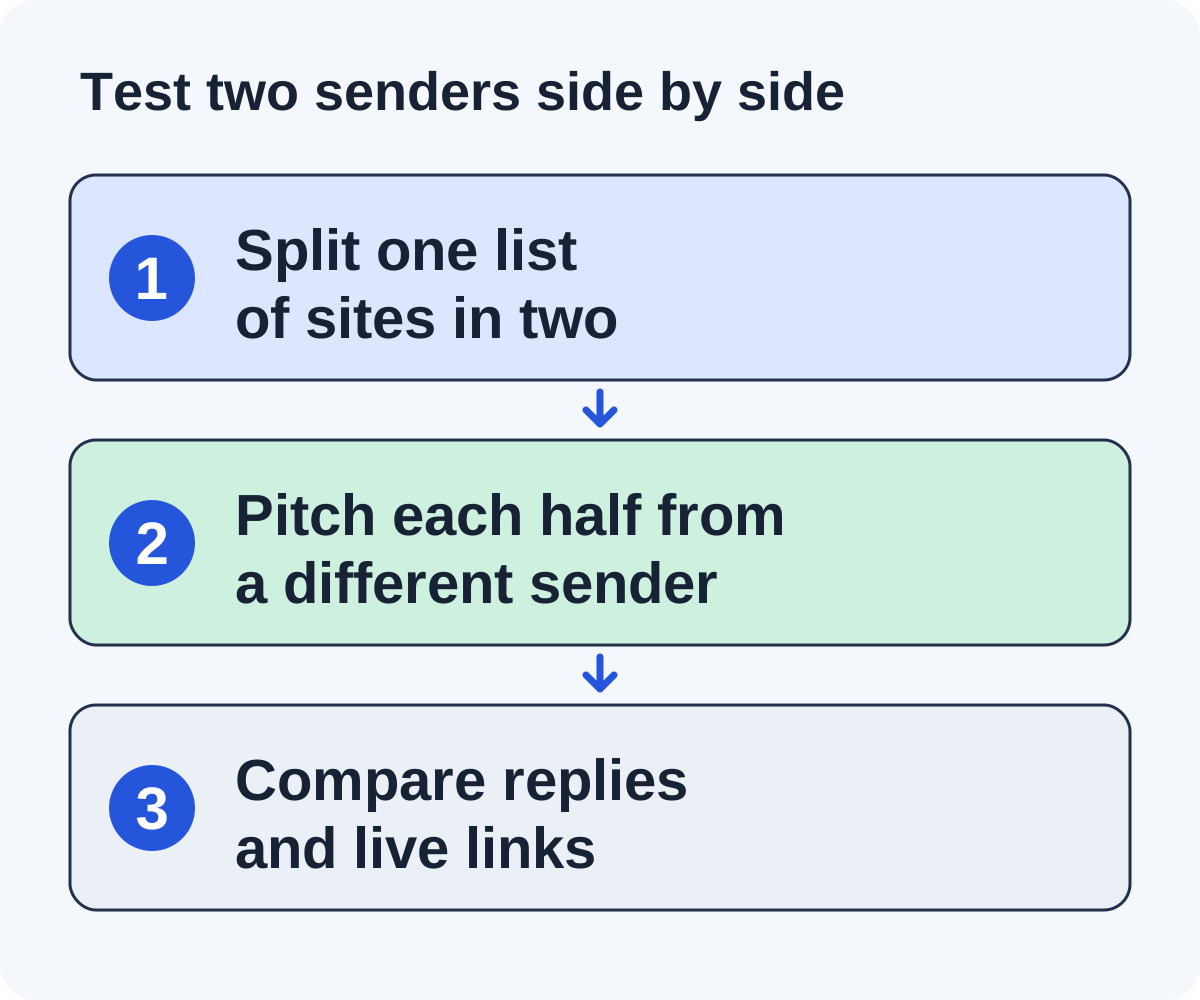
If where the email comes from is your reason to switch, test that one thing. It’s a test for you to run, not one we’ve carried out on these products.
Step one: split one list of sites
Take a list of sites that fit your market and split it in two, with the same mix of niches and sizes on each side.
Step two: pitch each half from a different sender
Pitch one half from your own inbox, through BacklinkGPT or by hand. Pitch the other half from a separate domain that has finished its warm-up. Keep the angle of the pitches the same, so the sender is the main difference.
Step three: compare replies and live links
After a month of sending, count replies, yeses and live links on each side. Also check your normal email: did anything you sent customers that month land in spam?
If both halves do about as well, decide on the other things that matter to you, such as daily volume, clients and price. Use the worksheet that comes with this guide to record both halves. For more on comparing tools, see choosing link building outreach software.
Questions about BacklinkGPT and its alternatives
How much does BacklinkGPT cost?
On October 18, 2026, Starter cost $149 a month for one inbox or LinkedIn profile and up to 6 pitches drafted a day. Growth cost $399 for up to 3 senders and 12 a day, and Scale $999 for up to 6 senders and 25 a day. Extra inboxes or profiles cost $19 a month each. Site fees come on top when you approve them.
Does BacklinkGPT work for agencies?
Its pricing page says it’s built for business owners and founders promoting their own site, and not for agencies or resellers managing client sites. Pitchbox is built for agencies, and Linkade’s larger plans run several clients, each with its own sender domain and mailbox.
Does BacklinkGPT send from my own email?
Yes. It sends from the mailbox you connect, or an alias on it, and replies land in that inbox. Its docs suggest a separate address on your domain, such as outreach@, for higher volumes.
When does BacklinkGPT start sending on its own?
After you approve 5 email pitches with little editing, email moves to auto-send. It tells you when that happens, and one click puts you back on approval. LinkedIn sends on its own only if you turn that on.
Which alternative is closest to BacklinkGPT?
MentionAgent, as another agent that finds sites, writes the pitches and drafts replies. It sends from a new domain instead of your inbox, and it mostly trades mentions rather than paying sites. Linkade is close on finding and pitching sites and keeps sites that charge, but it sends from a separate domain and you write the replies.
How soon do the first links arrive?
BacklinkGPT says replies usually start in week 2 or 3 and the first links go live in weeks 3 to 6, and it won’t promise a number. No outreach tool can, because each publisher decides.
Put it to work
Use the companion worksheet to apply the decisions in this guide to your own campaign.
Download the worksheet (.txt)See what is worth pitching for your site.
Linkade finds relevant pages and writes pitches from their content. Add your domain and inspect prospects before choosing a paid plan.
Start free